
On this occasion, we will explain the process of connecting a wireless client to a wireless network. For this, we will rely on the literature from the book «CWNA Certified Wireless Network Administrator Study Guide: Exam CWNA-108, 6th Edition,» page 317, where the 802.11 State Machine process is explained.
Management frames are used between the wireless client and the Access Point to establish a connection between them. Let’s briefly review the types of frames that fall within this category:
- Association request
- Association response
- Reassociation request
- Reassociation response
- Probe request
- Probe response
- Beacon
- Announcement traffic indication message (ATIM)
- Disassociation
- Authentication
- Deauthentication
- Action
- Action No ACK
- Timing advertisement
In this post, we will focus on the most common frames since the purpose is to understand this connectivity process in a simple way.
Returning to the state machine concept, we observe that a client goes through four states:
- State 1: Unauthenticated & Unassociated
- State 2: Authenticated, not associated
- State 3: Authenticated and associated (pending RSN authentication)
- State 4: Authenticated and associated
The purpose of the state machine is to allow clients and the Access Point to discover each other and establish a secure relationship, with the ultimate goal of the client joining the BSS. If no security is used, only three states are needed. In most cases, PSK or 802.1X/EAP authentication is required, and in that case, all four states will occur.
In this particular example, we will use an open network without security, so only three states will be present: State 1, State 2, and State 4.

Now, attempting to understand this process in a simplified manner, let’s use the following image.
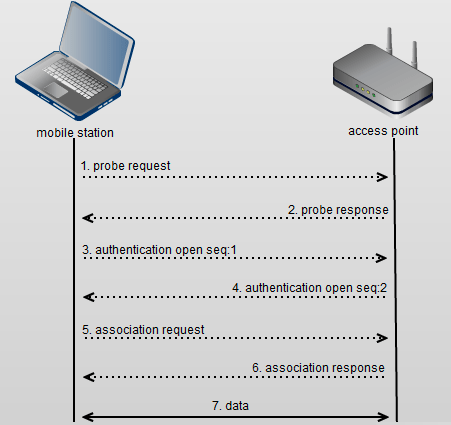
As seen, the connection process consists of the following steps:
- The client sends a probe request to the Access Point.
- The Access Point responds with a probe response.
- The client sends an authentication request (in reality, this request does not exist, but we will cover it in another post).
- The Access Point responds with an authentication response.
- The client sends an association request.
- The Access Point responds with an association response.
Now let’s examine this flow in a packet capture performed in Wireshark. If you wish to access the capture, you can obtain it here.
In this capture, we used a mobile phone with the MAC address 56ef.e0f7.c5a7. We will use a filter to view management frames from this device.
wlan.addr == 56ef.e0f7.c5a7 && wlan.fc.type == 0
The result is shown in the following screen:

The best way to understand this connection flow is to analyze the information contained in each of the frames.
I hope this post has offered you a general overview of the wireless clients’ connection process to wireless networks.

 Our techie journey
Deja un comentario