
Beacons are packets created and sent by access points at certain intervals, allowing wireless clients to connect to a specific BSS. Once the BSS has been selected, a series of frames are exchanged between the client and the AP to achieve this connection; this process is called the State Machine.
Within the 802.11-2016 standard, three connection states are declared as follows:
- Unauthenticated and unassociated
- Authenticated, not associated
- Authenticated and associated
- Unauthenticated and unassociated

Unauthenticated and unassociated
At home, I captured data to help us review this process. In the first image, we observe a packet called «probe request,» which belongs to management frames and is sent by a wireless station or client wishing to join the wireless network (BSS).

In the capture, it is shown that both the destination address (DA) and the reception address (RA) are broadcast addresses (ff:ff:ff:ff:ff:ff). This is because it is the client’s first time connecting to this network. In the same frame, you can see that both the transmission address (TA) and the source address (SA) are the addresses of the wireless client, in this case, my iPhone X. This initial connection process represents the first state of the «State Machine,»
«Not Authenticated – Not Associated.»
Authenticated, not associated
The next step begins with the client sending an authentication packet to the AP. It is important to note that this authentication process is not part of the client’s authentication; even if the network is unsecured, this packet exchange still occurs. In simple terms, the exchange of authentication packets is part of the «Open System Authentication» process. Another important observation to note is that there is no actual request in the authentication process. Many times when describing the connection process of a station, we say there is an authentication request, but it is actually an automatic process as part of the open system authentication. In the first image, the destination address (DA) and reception address (RA) are assigned to the address of the wireless router.

The second packet is generated by the AP and contains results of the authentication process. If the result is «successful,» then the station has been authenticated by the AP. If, on the contrary, the result is «unsuccessful,» then the wireless client will have to resend the packet to the AP. To review this information in a capture, it is necessary to find the authentication packet sent by the AP to the wireless client, and within the «IEEE 802.11 Wireless Management» block, find the «Status Code.» If everything is fine, you should observe the following information: «Successful (0X0000).» In the same section, another important field is «Authentication SEQ,» which should show a number 2. If there is a number greater than 2, it means that more than one authentication packet has been sent by the client.
Once this packet exchange with the expected values is completed, the client moves to an «Authenticated – Not Associated» state.

Authenticated and associated
Once the STA (Station) authenticates at the access point, the next step is to associate. Association occurs after the «Shared Key Authentication or Open System» algorithm. There cannot be a station that is associated but not authenticated. If the client fails in authentication, it cannot reach the associated state. Now, I think it’s important to provide a brief description of the «Open System» algorithm.
After the successful authentication of the client, it sends a unicast packet requesting association with the BSS. Again, the destination address (DA) and the reception address (RA) will be the address of the wireless router. Just like in the authentication process, the AP will send a «status code» and assign an «Associated ID» to the wireless client.
The first image corresponds to the first packet sent by the client to the AP.
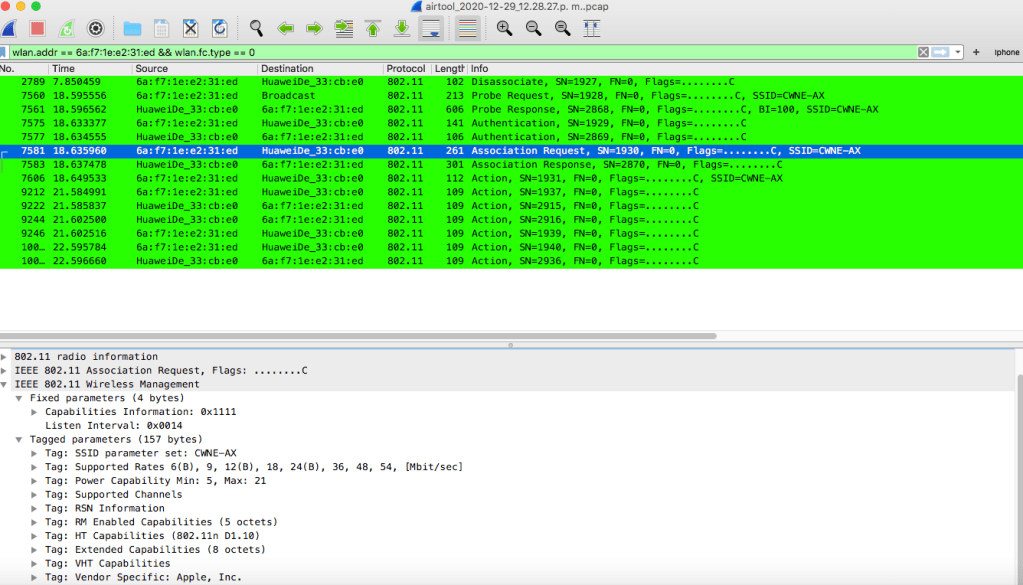
Association means that the client station has established layer 2 connectivity with the AP and has joined the BSS. The client station sends an association request management frame to the AP, seeking permission to join the BSS. The AP sends an association response management frame to the client, either granting or denying permission to join the BSS. Subsequently, the AP will send an association response packet where it will include the status and the AID (Association ID). The following image shows this information. It is important to check that the status code is «Successful (0x0000).»

Once this frame exchange is completed, the process goes to final state «Authenticated – Associated«

 Our techie journey
Deja un comentario